Assignment 6 (Joins)

SQL Joins & Subqueries Explained: Types, Syntax & 20 Real Queries
Topic: Understanding SQL Joins (INNER, LEFT, RIGHT, FULL OUTER) and Subqueries — with 20 assignment queries using the
employeeanddepttables.
When data lives across multiple tables, SQL Joins are how you bring it together. And when you need a query inside a query, that's where Subqueries come in. Together, these two concepts cover a huge portion of real-world SQL work — from reports and dashboards to backend data pipelines.
This guide covers the theory cleanly, then walks through all 20 assignment queries with context so you understand why each one works, not just what it does.
How SQL Joins Work
A JOIN combines rows from two or more tables based on a related column. The general algorithm Oracle follows is:
Step | What Happens |
|---|---|
1 | Cartesian product of the tables listed in |
2 | Filter matching rows based on the |
3 | Project (select) only the columns listed in |
Tables are joined on columns that share the same data type and logically matching values — usually a primary key from one table matching a foreign key in another.
Types of Joins in SQL
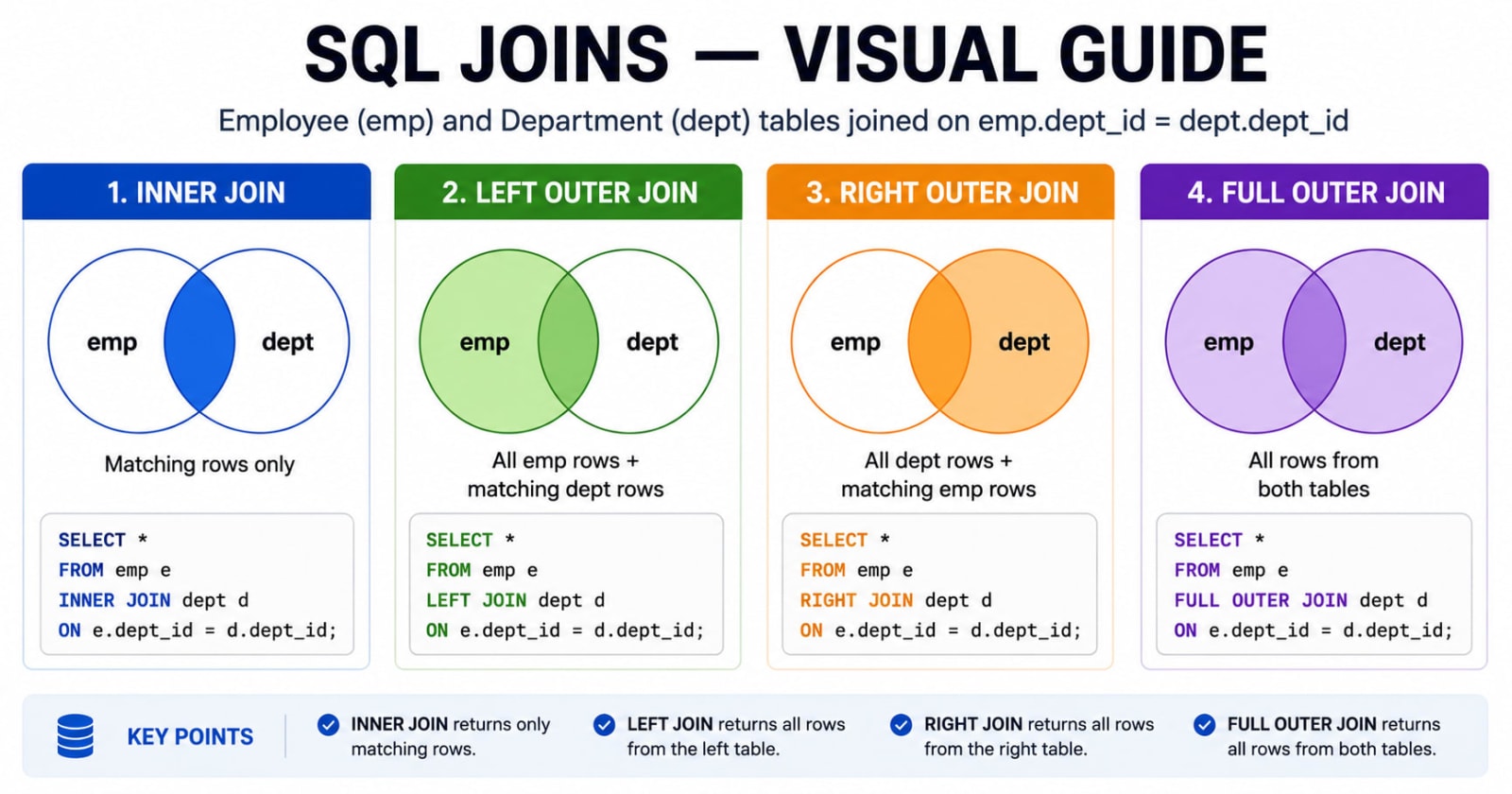
1. Cartesian Product (Cross Join)
Returns every possible combination of rows from both tables. Rarely useful on its own, but it's the foundation all other joins build on.
SELECT B.*, P.*
FROM student B, course P;
2. INNER JOIN
Returns only rows where the join condition matches in both tables.
SELECT B.*, P.*
FROM student B, course P
WHERE B.course# = P.course#;
3. LEFT OUTER JOIN
Returns all rows from the left table plus matching rows from the right. Non-matching right rows appear as NULL.
SELECT B.*, P.*
FROM student B LEFT JOIN course P
ON B.course# = P.course#;
4. RIGHT OUTER JOIN
Returns all rows from the right table plus matching rows from the left. Non-matching left rows appear as NULL.
SELECT B.*, P.*
FROM student B RIGHT JOIN course P
ON B.course# = P.course#;
5. FULL OUTER JOIN
Returns all rows from both tables. Non-matching rows from either side appear as NULL.
SELECT B.*, P.*
FROM student B FULL JOIN course P
ON B.course# = P.course#;
For a visual explanation of all join types, W3Schools has an excellent illustrated guide to SQL Joins.
What Is a Subquery?
A subquery is a SELECT statement nested inside another query. The inner query runs first, and its result is passed to the outer query.
Also called: Inner Query or Nested Query.
Subqueries can appear in: SELECT, INSERT, UPDATE, DELETE, WHERE, HAVING, and with operators like IN, ANY, ALL, BETWEEN.
Rules to Remember
Must be enclosed in parentheses
( )Must contain at least
SELECTandFROMCan include
WHERE,GROUP BY,HAVING,DISTINCTORDER BYis only allowed withTOP/LIMIT/FETCH FIRSTCan return a single value, a single row, a single column, or a full table
💡 If a subquery returns more than one value and you use
=, Oracle throws an error. UseINinstead when multiple rows are expected.
See the Oracle docs on Subqueries for the full specification.
Assignment 6 — All 20 Queries
Tables used:
employee,deptKey columns:emp_id,last_name,dept_id,salary,job_id,manager_id,dname,city
Query 1: Employee ID, Name, Dept ID & Department Name for All Employees
SELECT e.emp_id, e.last_name, e.dept_id, d.dname
FROM employee e
JOIN dept d ON e.dept_id = d.dept_id;
Basic INNER JOIN linking employee records to their department names.
Query 2: Department Number & Name for Employee SMITH
SELECT e.last_name, e.dept_id, d.dname
FROM employee e
JOIN dept d ON e.dept_id = d.dept_id
WHERE e.last_name = 'SMITH';
Query 3: Last Name, Department Name & City for Employees Earning > 2000
SELECT e.last_name, d.dname, d.city
FROM employee e
JOIN dept d ON e.dept_id = d.dept_id
WHERE e.salary > 2000;
Query 4: Employees Whose Last Name Contains 'A'
SELECT e.last_name, d.dname
FROM employee e
JOIN dept d ON e.dept_id = d.dept_id
WHERE e.last_name LIKE '%A%';
Query 5: Employee Name & Number Alongside Their Manager's Name & Number
SELECT e.last_name AS employee_lastname, e.emp_id,
       m.last_name AS manager_lastname, m.emp_id AS manager_id
FROM employee e
JOIN employee m ON e.manager_id = m.emp_id;
This is a self-join — joining the employee table to itself using different aliases. e is the employee, m is their manager (also an employee in the same table).
Query 6: LEFT, RIGHT, and FULL OUTER JOIN Between Employee and Dept
-- Left Outer Join
SELECT e.*, d.*
FROM employee e LEFT JOIN dept d ON e.dept_id = d.dept_id;

-- Right Outer Join
SELECT e.*, d.*
FROM employee e RIGHT JOIN dept d ON e.dept_id = d.dept_id;

-- Full Outer Join
SELECT e.*, d.*
FROM employee e FULL OUTER JOIN dept d ON e.dept_id = d.dept_id;
Query 7: Employees With the Same Job ID as Employee 7902
SELECT * FROM employee
WHERE job_id = (SELECT job_id FROM employee WHERE emp_id = 7902);
Scalar subquery — returns exactly one value (the job_id of employee 7902).
Query 8: Same Job as 7902 AND Salary Greater Than 7844
SELECT * FROM employee
WHERE job_id = (SELECT job_id FROM employee WHERE emp_id = 7902)
AND salary > (SELECT salary FROM employee WHERE emp_id = 7844);
Two independent scalar subqueries used in the same WHERE clause.
Query 9: Employees Earning the Minimum Salary
SELECT * FROM employee
WHERE salary = (SELECT MIN(salary) FROM employee);
Query 10: Departments Whose Minimum Salary Exceeds Dept 20's Minimum
SELECT dept_id, MIN(salary) AS min_salary
FROM employee
GROUP BY dept_id
HAVING MIN(salary) > (SELECT MIN(salary) FROM employee WHERE dept_id = 20);
Subquery inside HAVING — a common pattern when filtering aggregated groups against a dynamic value.
Query 11: Job With the Lowest Average Salary
SELECT job_id
FROM employee
GROUP BY job_id
ORDER BY AVG(salary) ASC
FETCH FIRST 1 ROW ONLY;
Query 12: Employees Who Work in a Department With Someone Named '%U%'
SELECT emp_id, last_name
FROM employee
WHERE dept_id IN (
  SELECT dept_id FROM employee WHERE last_name LIKE '%U%'
);
The subquery returns multiple department IDs, so IN is used instead of =.
Query 13: Employees Who Report to KING
SELECT e.last_name, e.salary
FROM employee e
JOIN employee m ON e.manager_id = m.emp_id
WHERE m.last_name = 'KING';
Another self-join — finding all employees whose manager is KING.
Query 14: Employee Earning the Maximum Salary
SELECT last_name
FROM employee
WHERE salary = (SELECT MAX(salary) FROM employee);
Query 15: Employees in '%U%' Departments Who Earn Above Average
SELECT emp_id, last_name, salary
FROM employee
WHERE dept_id IN (SELECT dept_id FROM employee WHERE last_name LIKE '%U%')
AND salary > (SELECT AVG(salary) FROM employee);
Query 16: Employees in the Same Department as Steven (Excluding Steven)
SELECT * FROM employee
WHERE dept_id = (SELECT dept_id FROM employee WHERE last_name = 'STEVEN')
AND last_name <> 'STEVEN';
Query 17: Employee Who Earns the Least
SELECT * FROM employee
WHERE salary = (SELECT MIN(salary) FROM employee);
Query 18: Department Number, Name & Employee Count — Three Variants
a) Departments with fewer than 3 employees:
SELECT d.dept_id, d.dname, COUNT(e.emp_id) AS emp_count
FROM dept d
LEFT JOIN employee e ON d.dept_id = e.dept_id
GROUP BY d.dept_id, d.dname
HAVING COUNT(e.emp_id) < 3;
b) Department with the highest number of employees:
SELECT dept_id, dname, emp_count FROM (
  SELECT d.dept_id, d.dname, COUNT(e.emp_id) AS emp_count,
         RANK() OVER (ORDER BY COUNT(e.emp_id) DESC) rnk
  FROM dept d LEFT JOIN employee e ON d.dept_id = e.dept_id
  GROUP BY d.dept_id, d.dname
) WHERE rnk = 1;
c) Department with the lowest number of employees:
SELECT dept_id, dname, emp_count FROM (
  SELECT d.dept_id, d.dname, COUNT(e.emp_id) AS emp_count,
         RANK() OVER (ORDER BY COUNT(e.emp_id) ASC) rnk
  FROM dept d LEFT JOIN employee e ON d.dept_id = e.dept_id
  GROUP BY d.dept_id, d.dname
) WHERE rnk = 1;
Parts b and c use RANK() OVER — a window function that ranks departments by employee count without collapsing the result set.
Query 19: Employees Who Earn More Than Their Manager
SELECT e.last_name, e.salary, m.last_name AS manager, m.salary AS manager_salary
FROM employee e
JOIN employee m ON e.manager_id = m.emp_id
WHERE e.salary > m.salary;
Self-join again — comparing each employee's salary to their own manager's salary in a single pass.
Query 20: Department Number, Name & Total Employee Count
SELECT d.dept_id, d.dname, COUNT(e.emp_id) AS total_employees
FROM dept d
LEFT JOIN employee e ON d.dept_id = e.dept_id
GROUP BY d.dept_id, d.dname;
LEFT JOIN ensures departments with zero employees still appear in the result (with a count of 0).
Common Mistakes to Avoid
Using
=with a multi-row subquery — if the subquery can return more than one row, useINnot=.Forgetting LEFT JOIN when you need empty departments — INNER JOIN silently drops departments with no employees.
Self-joins without aliases — always use two different aliases (like
eandm) or Oracle won't know which copy of the table you mean.Putting aggregate conditions in WHERE — use
HAVINGafterGROUP BYfor aggregate filters.
For a deeper dive into subquery patterns, GeeksforGeeks covers correlated vs non-correlated subqueries with clear examples.