Triggers

SQL Triggers Explained — With Real MCQs From Accenture Assessments
Database triggers, MySQL trigger syntax, and trigger examples — everything you need to understand automated database actions, written for students preparing for placement assessments at companies like Accenture, TCS, and Wipro.
Most blogs teach you what a trigger is. This one teaches you what a trigger does to you when you write it wrong — and how to get it right the first time.
If you've ever wondered why a row disappeared silently, why a log table kept filling up with duplicate entries, or why your database threw an error you never wrote — there was probably a trigger involved. That's exactly why understanding them matters.
Before diving in, make sure you're comfortable with basic SQL — if not, start with the SQL Quick Recap first, then come back here.
What Is a Trigger, Really?
Think of a trigger as a security guard that wakes up every time something happens to your table.
You don't call the guard. You don't press a button. The moment a row is inserted, updated, or deleted — the guard automatically executes whatever instructions you left.
That's the whole idea. A trigger is automatic, invisible, and attached directly to a table event.
CREATE TRIGGER trigger_name
{BEFORE | AFTER} {INSERT | UPDATE | DELETE}
ON table_name
FOR EACH ROW
BEGIN
    -- what you want to happen automatically
END;
Read that structure once more. Three decisions you make every time:
When — BEFORE the change happens, or AFTER?
What event — INSERT, UPDATE, or DELETE?
What to do — the actual logic inside BEGIN...END
Get those three right and the rest is just SQL you already know.
For a deeper understanding of how triggers fit into database design, the MySQL documentation on trigger syntax is worth bookmarking — it covers edge cases that assessments love to test.
SQL Trigger lifecycle
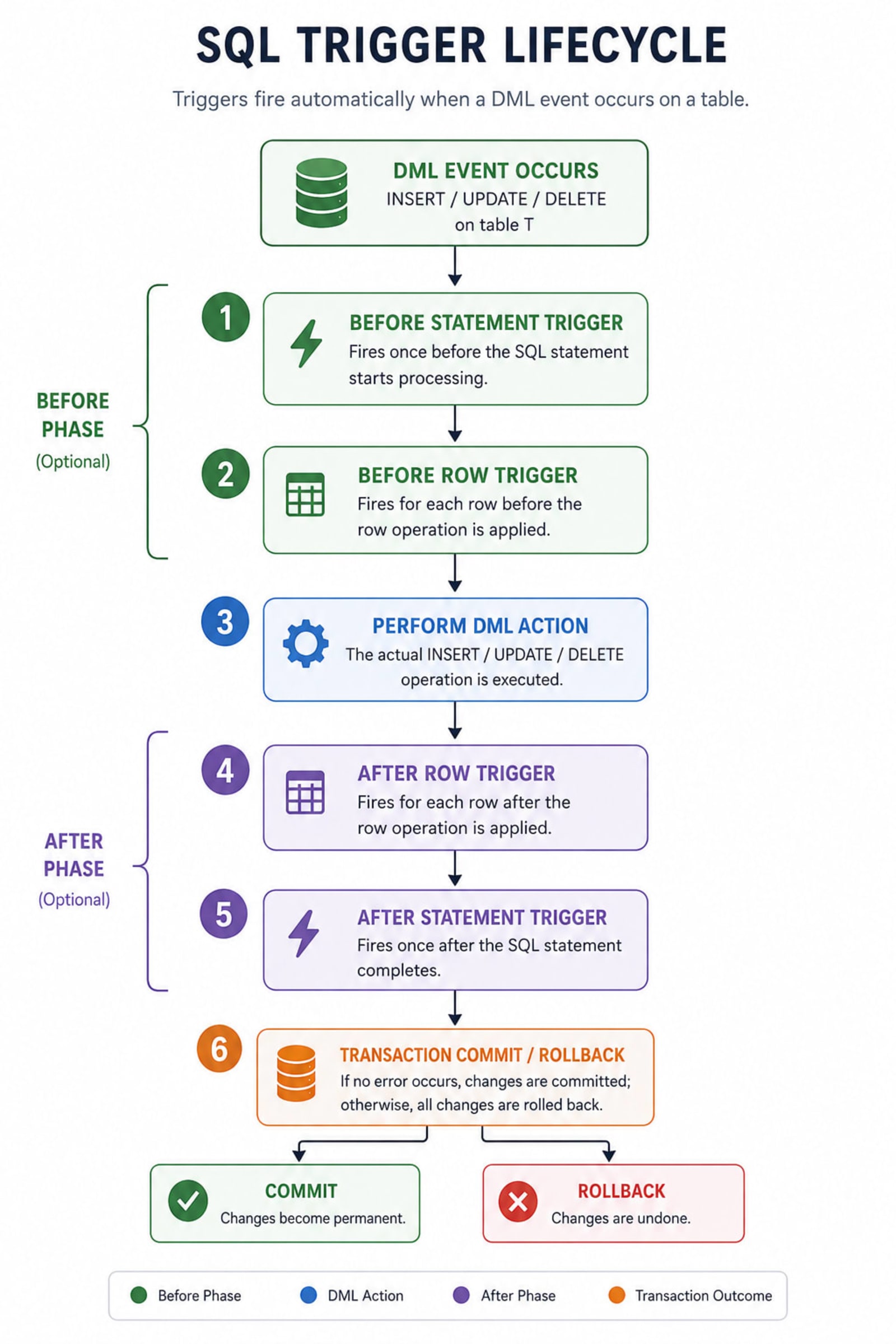
BEFORE vs AFTER — This Is Where Most People Get Confused
This single decision determines whether your trigger can prevent something or only react to it.
BEFORE | AFTER | |
|---|---|---|
Can stop the operation? | ✅ Yes — use SIGNAL | ❌ No, too late |
Can read NEW values? | ✅ Yes, and even modify them | ✅ Yes, read-only |
Best for | Validation, blocking bad data | Logging, auditing, syncing |
Risk if query fails | Trigger doesn't run | Trigger already ran |
The rule of thumb: if your trigger protects data, use BEFORE. If it records what happened, use AFTER.
OLD and NEW — The Two Keywords You'll Use Constantly
When a trigger fires, it gets access to two special row references:
OLD— what the row looked like before the changeNEW— what the row looks like after the change
Not every event gives you both:
Event | OLD available? | NEW available? |
|---|---|---|
INSERT | ❌ Nothing existed before | ✅ Yes |
UPDATE | ✅ Yes | ✅ Yes |
DELETE | ✅ Yes | ❌ Nothing exists after |
This is why a backup trigger on DELETE uses OLD.column — the row is already gone, so NEW doesn't exist.
The One Restriction That Trips Everyone Up
You cannot use COMMIT or ROLLBACK inside a trigger.
Triggers run inside the same transaction as the statement that fired them. They don't get their own. If the main query rolls back, the trigger's work rolls back too. If you try to manually commit inside a trigger, MySQL throws an error.
Also: you cannot call a trigger manually. There's no EXEC trigger_name. They only fire when their table event happens. If you need to test one, you have to actually run an INSERT/UPDATE/DELETE.
10 Real MCQs From Accenture Technical Assessments
These aren't made-up examples. These patterns appear directly in company assessments. Understanding why each answer is correct matters more than memorizing the code.
1. Student Record Backup on Deletion
Scenario: When a student is deleted from students, automatically save their record to student_backup with the deletion timestamp.
CREATE TRIGGER after_student_delete
AFTER DELETE ON students
FOR EACH ROW
BEGIN
    INSERT INTO student_backup (student_id, name, department, deleted_on)
    VALUES (OLD.student_id, OLD.name, OLD.department, NOW());
END;
Why AFTER DELETE? The student is already gone from the main table — we're reacting, not preventing. We use OLD because NEW doesn't exist after a delete.
Why not BEFORE? We want the deletion to succeed first. If we put this in a BEFORE trigger and the INSERT somehow failed, it could block the delete.
2. Salary Update Log
Scenario: Every time an employee's salary changes, log the old amount, new amount, and when it happened.
CREATE TRIGGER after_salary_update
AFTER UPDATE ON employees
FOR EACH ROW
BEGIN
    INSERT INTO salary_log (emp_id, old_salary, new_salary, updated_on)
    VALUES (OLD.emp_id, OLD.salary, NEW.salary, NOW());
END;
The key insight here: OLD.salary and NEW.salary exist simultaneously inside an UPDATE trigger. This is the only event where you get both — use it whenever you need a before/after comparison in your log.
3. New Employee Registration Log
Scenario: When a new employee is added, automatically log their ID and join date.
CREATE TRIGGER after_employee_insert
AFTER INSERT ON employees
FOR EACH ROW
BEGIN
    INSERT INTO register_log (emp_id, joined_on)
    VALUES (NEW.emp_id, NOW());
END;
Notice: No OLD here — on an INSERT, the row didn't exist before, so OLD is undefined. Always NEW on inserts.
4. Product Deletion Tracker
Scenario: Log the product ID and exact time whenever a product is deleted.
CREATE TRIGGER after_product_delete
AFTER DELETE ON products
FOR EACH ROW
BEGIN
    INSERT INTO product_log (prod_id, deleted_at)
    VALUES (OLD.prod_id, NOW());
END;
Same pattern as #1 — AFTER DELETE, always OLD. If you remember nothing else from this section, remember: delete = OLD, insert = NEW, update = both.
5. Validate Order Total Before Insert
Scenario: Reject any order where total_amount is negative, before it ever hits the table.
CREATE TRIGGER before_order_insert
BEFORE INSERT ON orders
FOR EACH ROW
BEGIN
    IF NEW.total_amount < 0 THEN
        SIGNAL SQLSTATE '45000'
        SET MESSAGE_TEXT = 'Total amount cannot be negative';
    END IF;
END;
This is the validation pattern — and it's the most important one in any assessment. SIGNAL SQLSTATE '45000' is how MySQL throws a custom error from inside a trigger. The 45000 code means "user-defined exception." The INSERT never completes, the row never reaches the table.
Why BEFORE? Because we want to stop bad data from entering at all. AFTER would be too late.
6. Attendance Update Monitor
Scenario: Log old and new attendance percentage whenever it changes.
CREATE TRIGGER after_attendance_update
AFTER UPDATE ON attendance
FOR EACH ROW
BEGIN
    INSERT INTO attendance_log (stud_id, old_percent, new_percent, updated_on)
    VALUES (OLD.stud_id, OLD.percentage, NEW.percentage, NOW());
END;
Straightforward AFTER UPDATE. The interesting production question here: what if someone updates the row but the percentage doesn't actually change? You'd still log it. See #8 for how to fix that.
7. Prevent Deletion of Admin Users
Scenario: Admin users cannot be deleted. If someone tries, throw an error and block it.
CREATE TRIGGER before_user_delete
BEFORE DELETE ON users
FOR EACH ROW
BEGIN
    IF OLD.role = 'Admin' THEN
        SIGNAL SQLSTATE '45000'
        SET MESSAGE_TEXT = 'Cannot delete Admin users';
    END IF;
END;
BEFORE DELETE with SIGNAL — the protection pattern. This is used heavily in production for protecting critical records. Notice we check OLD.role because that's the row being deleted.
8. Log Department Change Only When It Actually Changed
Scenario: Only write to the log if the department actually changed — not on every UPDATE.
CREATE TRIGGER after_dept_update
AFTER UPDATE ON employees
FOR EACH ROW
BEGIN
    IF OLD.department <> NEW.department THEN
        INSERT INTO dept_change_log (emp_id, old_dept, new_dept, updated_on)
        VALUES (OLD.emp_id, OLD.department, NEW.department, NOW());
    END IF;
END;
This is the conditional log pattern — and it's smarter than #6. In real systems, UPDATE statements fire even when nothing meaningful changed (batch jobs, ORM quirks). Comparing OLD vs NEW before logging keeps your audit table clean and meaningful.
9. Customer Insertion Tracker
Scenario: Log when a new customer was created.
CREATE TRIGGER after_customer_insert
AFTER INSERT ON customers
FOR EACH ROW
BEGIN
    INSERT INTO customer_log (cust_id, created_on)
    VALUES (NEW.cust_id, NOW());
END;
AFTER INSERT, NEW only. This is the cleanest trigger pattern — react to a successful insert, log it. Nothing can go wrong here because you're not blocking anything.
10. Prevent Negative Price on Product Update
Scenario: Before any price update, check that the new price is not negative.
CREATE TRIGGER before_price_update
BEFORE UPDATE ON products
FOR EACH ROW
BEGIN
    IF NEW.price < 0 THEN
        SIGNAL SQLSTATE '45000'
        SET MESSAGE_TEXT = 'Price cannot be negative';
    END IF;
END;
BEFORE UPDATE — validation on write. The new value is available via NEW.price even before it's saved, which is what makes BEFORE triggers so powerful for data integrity.
Pattern Recognition — The Cheat Sheet
Once you see the pattern, assessments become easy:
Scenario type | Timing | Event | Keyword |
|---|---|---|---|
Log what was deleted | AFTER | DELETE | OLD |
Log what was inserted | AFTER | INSERT | NEW |
Log before/after a change | AFTER | UPDATE | OLD + NEW |
Block bad data on insert | BEFORE | INSERT | NEW + SIGNAL |
Block bad data on update | BEFORE | UPDATE | NEW + SIGNAL |
Protect rows from deletion | BEFORE | DELETE | OLD + SIGNAL |
Log only real changes | AFTER | UPDATE | IF OLD <> NEW |
Common Mistakes to Avoid
Using AFTER when you need BEFORE for validation. Once the row hits the table, you can't un-insert it from inside a trigger. Always validate in BEFORE.
Forgetting that DELETE has no NEW. Writing NEW.column inside a DELETE trigger causes an error. The row is gone — only OLD exists.
Not handling NULL in comparisons. IF OLD.department <> NEW.department fails silently when either value is NULL. In production, use COALESCE or IS DISTINCT FROM to handle NULLs safely.
Writing triggers that call each other. If Trigger A updates Table B, and Table B has Trigger B that updates Table A — you get an infinite loop. MySQL limits recursive trigger depth, but hitting that limit crashes the query.
Forgetting DELIMITER in MySQL CLI. The semicolon inside your BEGIN...END block terminates the CREATE TRIGGER statement early. Use DELIMITER // before and DELIMITER ; after when running triggers from the command line.
GeeksforGeeks has a solid reference on MySQL trigger restrictions that's worth reading before any assessment — it covers the COMMIT/ROLLBACK restriction and recursive trigger limits in detail.
What's Next
Triggers are one part of database automation. Once you're comfortable here, the natural progression is:
Views — virtual tables built from queries, great for simplifying complex joins
Stored Procedures — reusable logic blocks you call explicitly (unlike triggers)
Transactions — manual COMMIT/ROLLBACK control that triggers run inside of
If the joins and subqueries post felt comfortable, triggers will click quickly. The mental model is the same — you're still writing SELECT, INSERT, and conditionals. You're just telling the database when to run them automatically.
Related Notes
Continue your SQL journey with these notes from NoteHub:
SQL Series
Introduction to SQL — Start here if you're new to SQL
SQL Quick Recap — Core concepts in ~10 mins
SQL Single Row Functions — Assignment 4 — String, number, date functions
SQL Aggregate Functions — Assignment 5 — GROUP BY, HAVING, COUNT, SUM
SQL Joins & Subqueries — Assignment 6 — INNER, LEFT, RIGHT, FULL OUTER joins
SQL Views — Assignment 8 — Creating and managing views
PL/SQL — Assignment 9 — Procedural SQL blocks
DBMS Foundations
DBMS Overview — Database concepts before SQL
Placement Prep
Accenture Cognitive & Technical Assessment — Full guide with tips
Accenture OA Round 2 Coding Test — Coding round prep