CDN Explained: How Edge Caching Makes the Web Feel Instant

CDN & Web Performance: The Complete Guide for JavaScript Developers
You've shipped a feature. The code is clean, the logic is tight. You open it on your phone over 4G and watch it spin for four seconds before anything renders. Meanwhile, a random startup's site loads in under a second. Same device, same network — wildly different experience.
The difference, almost always, is how smart they are about delivering content. And sitting at the center of that is the Content Delivery Network.
This guide covers everything: what CDNs actually do at a technical level, how edge caching and compression work, how your CDN choices directly affect Google rankings through Core Web Vitals, and the exact patterns JS developers use every single day.
What Is a CDN, Actually?
A Content Delivery Network is a globally distributed network of servers — called Points of Presence (PoPs) — that store cached copies of your content and serve them to users from the nearest location.
Without a CDN, every request hits your origin server — one machine in one data center. A user in Mumbai requesting a file from a server in Virginia is sending a packet on a 12,000-kilometer round trip. Even at the speed of light through fiber, that's 150–200ms of raw latency — before a single byte of your page arrives.
With a CDN, that same user gets files from a server in Chennai or Singapore. Latency drops to under 20ms. Pages that felt sluggish suddenly feel instant.
The Physics Principle: Data travels through fiber optic cables at roughly ⅔ the speed of light. You can't outrun physics — but you can shorten the distance. That's CDN in one sentence.
Providers like Cloudflare (300+ PoPs), AWS CloudFront, Fastly, and Akamai run these global networks. When you deploy on Vercel or Netlify, you're already using their CDN layer — it's just abstracted away.
Edge Caching: How It Actually Works
Edge caching is the mechanism that makes CDNs powerful. Here's the precise flow when a user requests a file:
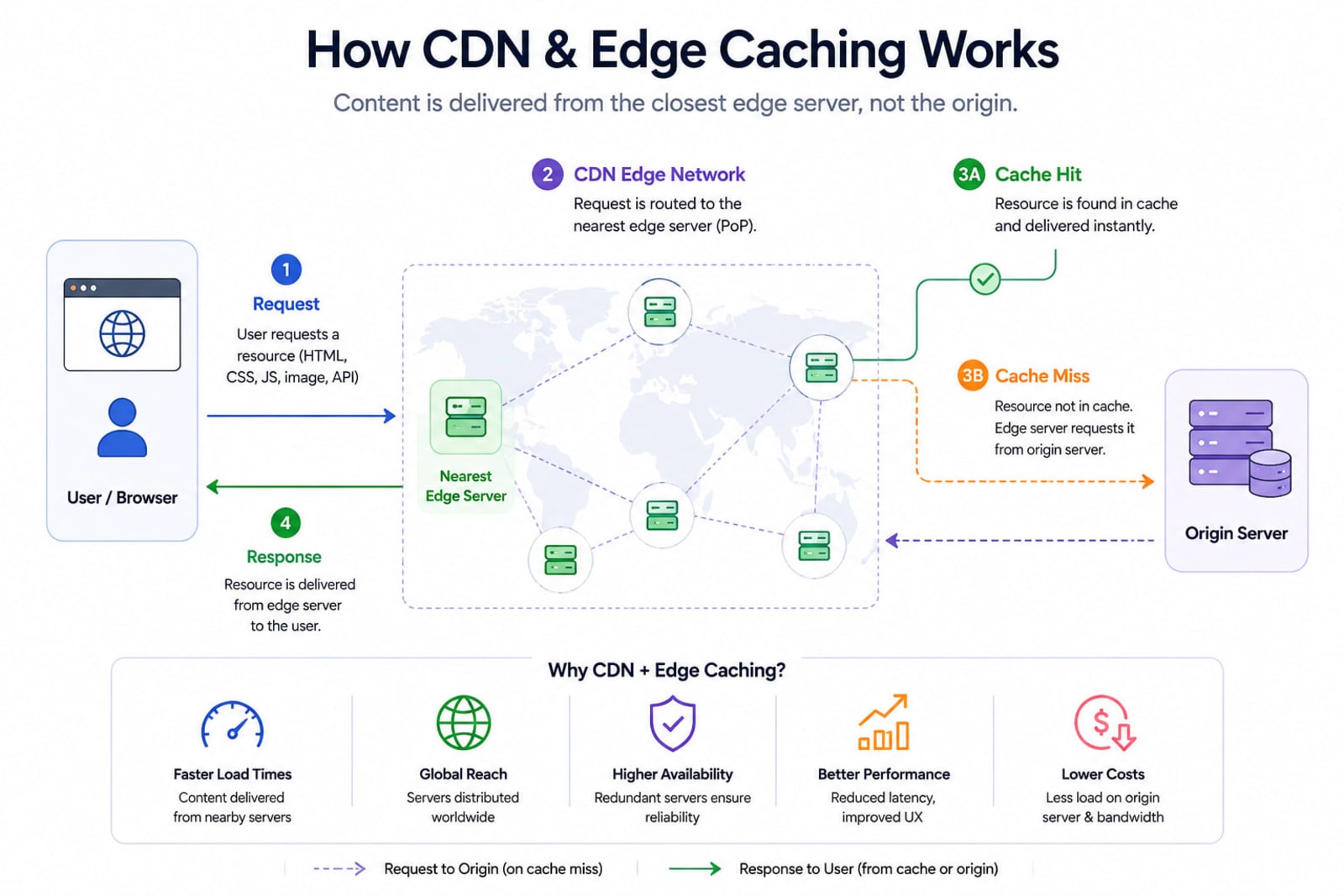
Cache Miss — First Request: User requests
logo.svg. The nearest edge node has no copy. The edge node fetches it from your origin server.Store at Edge: The edge node serves the file to the user and stores a local copy, obeying your
Cache-Controlheaders for TTL.Cache Hit — Every Request After: Every subsequent user in that region gets the file instantly from the edge. Your origin server is never involved again — until the cache expires.
Cache-Control Headers: You're in Charge
The CDN respects your HTTP cache headers. Setting them correctly is one of the highest-leverage performance tasks a developer can do.
# Hashed JS/CSS — cache forever, never stale
Cache-Control: public, max-age=31536000, immutable

# HTML pages — always revalidate
Cache-Control: public, max-age=0, must-revalidate

# API responses — never cache
Cache-Control: no-store

# Serve stale while fetching fresh copy in background
Cache-Control: public, max-age=60, stale-while-revalidate=3600

# File fingerprint for conditional requests
ETag: "a3f9c2b1d8e7"
⚠ Common Mistake: Developers often set
max-age=31536000on HTML files. This means users get stale routing for a full year after a deploy. Always use short TTLs on HTML. Long cache only goes on hashed assets.
Debugging Cache Status in JS
async function checkCacheStatus(url) {
  const res = await fetch(url, { cache: 'no-store' });

  console.table({
    'CF-Cache-Status': res.headers.get('cf-cache-status'), // HIT / MISS
    'Age (seconds)':   res.headers.get('age'),             // Time in cache
    'Cache-Control':   res.headers.get('cache-control'),
    'ETag':            res.headers.get('etag'),
  });
}

checkCacheStatus('https://yourdomain.com/assets/main.a3f9.js');
// CF-Cache-Status: HIT ✅ — served from edge, not origin
Cloudflare cache status values:
HIT— Served from edge cache ✅MISS— Fetched from origin (first time or expired)EXPIRED— Cached but TTL ran out, fetching freshBYPASS— Cache skipped (cookies, auth headers, etc.)DYNAMIC— Not cacheable (API responses)
Static Asset Delivery & Content Hashing
CDNs shine brightest on static assets — files that are identical for every user. For a modern React or Next.js app, that's 90% of what you serve:
JavaScript bundles (
.js,.mjs)CSS stylesheets (
.css)Images (
.webp,.avif,.svg)Web fonts (
.woff2)JSON config files
Content Hashing: Cache Forever, Update Instantly
The trick that makes aggressive caching safe is content hashing. Your bundler appends a hash of the file's contents to its filename:
// vite.config.js
import { defineConfig } from 'vite'

export default defineConfig({
  build: {
    rollupOptions: {
      output: {
        entryFileNames: 'assets/[name].[hash].js',
        chunkFileNames: 'assets/[name].[hash].js',
        assetFileNames: 'assets/[name].[hash].[ext]',
      }
    }
  }
})

// Build output:
// assets/index.a3f9c2b1.js    ← safe to cache 1 year
// assets/styles.88d42e17.css  ← new hash = new file = fresh CDN fetch
// index.html                  ← no hash, short TTL
When you change a file, the hash changes. The CDN treats it as a completely new file and fetches a fresh copy. You get permanent caching and instant updates simultaneously.
Serving from Express Behind a CDN
import express from 'express'
import path    from 'path'

const app = express()

// Hashed assets — 1 year, immutable
app.use('/assets', express.static(
  path.join(__dirname, 'dist/assets'),
  { maxAge: '1y', immutable: true }
))

// HTML — always revalidate
app.use(express.static(
  path.join(__dirname, 'dist'),
  { maxAge: 0, etag: true }
))

// API — never cache
app.use('/api', (req, res, next) => {
  res.set('Cache-Control', 'no-store')
  next()
})
Brotli Compression: The Free 25% Win
Before your files travel over the network, a CDN compresses them. Most developers know Gzip. Fewer know that Brotli — Google's compression algorithm, supported by all modern browsers — delivers 15–25% better compression than Gzip for text-based assets.
File | Unminified | After Minification | After Brotli-11 |
|---|---|---|---|
JS bundle | 500 KB | 200 KB | ~52 KB |
CSS | 120 KB | 80 KB | ~18 KB |
HTML | 40 KB | 30 KB | ~8 KB |
Most major CDNs (Cloudflare Pro+, Fastly, Vercel) apply Brotli automatically. You can also pre-compress at build time:
# Install brotli CLI
brew install brotli   # macOS
apt install brotli    # Ubuntu

# Compress your dist folder after build
find dist -type f \( -name "*.js" -o -name "*.css" -o -name "*.html" \) \
  -exec brotli -q 11 {} \;

# Creates: main.a3f9.js.br alongside main.a3f9.js
# Serve the .br file with Content-Encoding: br header# Cloudflare Pages — _headers file
/assets/*.br
Content-Encoding: br
Content-Type: application/javascript
Cache-Control: public, max-age=31536000, immutable
/*.html
Cache-Control: public, max-age=0, must-revalidateGood Practice: Never compress already-compressed formats — JPEG, PNG, MP4, WebP. Compressing binary files often increases file size. Focus Brotli/Gzip on text: HTML, CSS, JS, JSON, SVG, XML.
HTTP/3 & QUIC: Why Your CDN Choice Matters
HTTP/2 was a massive improvement over HTTP/1.1 — it multiplexed many requests over one TCP connection. But TCP has a fatal flaw: head-of-line blocking. One dropped packet stalls the entire connection.
HTTP/3 runs over QUIC — a UDP-based protocol where each request stream is independent. A dropped packet only affects that one stream. On mobile networks or high-latency connections, this translates to noticeably faster loads.
Protocol | Transport | Multiplexing | HOL Blocking | Best For |
|---|---|---|---|---|
HTTP/1.1 | TCP | No | Yes | Legacy |
HTTP/2 | TCP | Yes | Yes (TCP) | Most sites today |
HTTP/3 | QUIC (UDP) | Yes | No ✅ | Mobile, high latency |
You don't write code to use HTTP/3 — pick a CDN that supports it (Cloudflare, Fastly, Vercel), and it negotiates automatically. Check if your site is on HTTP/3:
# Check protocol
curl -I --http3 https://yourdomain.com 2>&1 | grep -i "HTTP/"
# HTTP/3 200 ✅

# Check if HTTP/3 is advertised
curl -sI https://yourdomain.com | grep alt-svc
# alt-svc: h3=":443"; ma=86400
CDN & Core Web Vitals: The Direct SEO Connection
Google's Core Web Vitals — LCP, INP, and CLS — are search ranking signals. A slow site ranks lower, full stop. And CDN configuration directly affects all three.
Metric | Target | How CDN Helps |
|---|---|---|
LCP (Largest Contentful Paint) | < 2.5s | Hero image served from edge cuts TTFB from 500ms to <50ms |
INP (Interaction to Next Paint) | < 200ms | Smaller, faster-arriving JS = less parse/execute time |
CLS (Cumulative Layout Shift) | < 0.1 | Fonts and images with set dimensions avoid shifts |
TTFB (Time to First Byte) | < 800ms | Cached HTML at edge dramatically cuts server response time |
Real-world numbers: One site dropped LCP from 4.8s to 1.8s after adding CDN + image optimization — a 62% improvement that resulted in +47% organic traffic in 4 months. Another publication improved LCP by 80% and reduced bounce rates by 43% after passing Core Web Vitals thresholds.
Preloading Critical CDN Resources
<head>
  <!-- Warm up CDN connection BEFORE browser needs it -->
  <link rel="preconnect" href="https://cdn.yourdomain.com" crossorigin />
  <link rel="dns-prefetch" href="https://cdn.yourdomain.com" />

  <!-- Preload LCP image — biggest direct LCP improvement -->
  <link
    rel="preload"
    href="https://cdn.yourdomain.com/hero.f7c3.webp"
    as="image"
    type="image/webp"
    fetchpriority="high"
  />

  <!-- Preload main font to prevent FOUT -->
  <link
    rel="preload"
    href="https://cdn.yourdomain.com/font.woff2"
    as="font"
    type="font/woff2"
    crossorigin
  />
</head>
LCP Quick Win: Add
fetchpriority="high"to your hero<img>tag. Takes 10 seconds. Tells the browser to download it above everything else. Direct, measurable LCP improvement.
Day-to-Day Patterns: What Developers Actually Do
1. Loading Libraries from CDN (No Bundler)
For vanilla HTML projects or quick prototypes, public CDNs like jsDelivr and unpkg host every npm package:
<!-- Warm up connection first -->
<link rel="preconnect" href="https://cdn.jsdelivr.net" crossorigin />

<!-- Load with SRI hash — protects against CDN compromise -->
<script
  src="https://cdn.jsdelivr.net/npm/lodash@4.17.21/lodash.min.js"
  integrity="sha512-WFN04846sdKMIP5LK..."
  crossorigin="anonymous"
  referrerpolicy="no-referrer"
></script>

<!-- Chart.js from cdnjs -->
<script
  src="https://cdnjs.cloudflare.com/ajax/libs/Chart.js/4.4.1/chart.umd.min.js"
  crossorigin="anonymous"
></script>
2. Deploying Behind Vercel CDN
// vercel.json
{
  "headers": [
    {
      "source": "/assets/(.*)",
      "headers": [
        { "key": "Cache-Control", "value": "public, max-age=31536000, immutable" }
      ]
    },
    {
      "source": "/(.*).html",
      "headers": [
        { "key": "Cache-Control", "value": "public, max-age=0, must-revalidate" }
      ]
    },
    {
      "source": "/api/(.*)",
      "headers": [
        { "key": "Cache-Control", "value": "no-store" }
      ]
    }
  ]
}
3. Deploying to Cloudflare Pages
npm install -g wrangler
wrangler pages deploy dist/
Your files are live on 300+ edge nodes globally within seconds.
4. Purging CDN Cache After Every Deploy
Build this into your deploy pipeline so stale content never survives a release:
// scripts/purge-cache.js
const CF_ZONE  = process.env.CF_ZONE_ID
const CF_TOKEN = process.env.CF_API_TOKEN

async function purge(paths) {
  const res = await fetch(
    `https://api.cloudflare.com/client/v4/zones/${CF_ZONE}/purge_cache`,
    {
      method: 'POST',
      headers: {
        'Authorization': `Bearer ${CF_TOKEN}`,
        'Content-Type':  'application/json',
      },
      body: JSON.stringify({ files: paths }),
    }
  )
  const data = await res.json()
  console.log(data.success ? '✅ Purged' : '❌ Failed', data.errors)
}

await purge([
  'https://yourdomain.com/index.html',
  'https://yourdomain.com/sitemap.xml',
])// package.json
{
"scripts": {
"deploy": "npm run build && npm run upload && node scripts/purge-cache.js"
}
}5. AWS CloudFront + S3
# Build and sync
npm run build
aws s3 sync dist/ s3://your-bucket --delete

# Hashed assets — long cache
aws s3 sync dist/assets/ s3://your-bucket/assets/ \
  --cache-control "public, max-age=31536000, immutable"

# HTML — no cache
aws s3 sync dist/ s3://your-bucket/ \
  --exclude "assets/*" \
  --cache-control "public, max-age=0, must-revalidate"

# Invalidate CloudFront after deploy
aws cloudfront create-invalidation \
  --distribution-id YOUR_DIST_ID \
  --paths "/*"
Edge Computing: Running JS at the CDN Layer
Modern CDNs let you run code at the edge — meaning server-side logic executes on the CDN node closest to your user, not on your origin server. Zero round-trip to your backend.
Cloudflare Workers
// Geo-routing + A/B testing at the edge
export default {
  async fetch(request) {
    const url = new URL(request.url)

    // Redirect Indian users to regional endpoint
    if (request.cf?.country === 'IN') {
      url.hostname = 'in.yourdomain.com'
      return fetch(url.toString(), request)
    }

    // 50/50 A/B test — no origin involved
    if (url.pathname === '/' && Math.random() < 0.5) {
      url.pathname = '/variant-b'
      return fetch(url.toString(), request)
    }

    return fetch(request)
  }
}# Deploy to all 300+ PoPs instantly
wrangler deployVercel Edge Middleware (Next.js)
// middleware.js — runs at CDN layer, not your Node server
import { NextResponse } from 'next/server'

export function middleware(request) {
  const ua = request.headers.get('user-agent') || ''

  // Block bots before they hit your origin
  if (ua.includes('BadBot')) {
    return new NextResponse('Forbidden', { status: 403 })
  }

  const response = NextResponse.next()
  response.headers.set('X-Region', request.geo?.region || 'unknown')
  return response
}

export const config = {
  matcher: ['/((?!_next/static|favicon.ico).*)'],
}
Performance Good Practices Checklist
Use this as a pre-launch audit. Every item is a real, measurable performance win.
✅ Content-hash all JS/CSS filenames — enables permanent caching safely. Vite and Next.js do this by default; verify your build output.
✅
immutableon hashed assets —Cache-Control: public, max-age=31536000, immutable. CDN never needs to revalidate.✅ Short TTL on HTML —
max-age=0, must-revalidate. Never let routing go stale after a deploy.✅ Enable Brotli compression — 15–25% smaller than Gzip. Most CDNs handle this automatically or via config file.
✅
rel="preconnect"for every CDN domain — saves 100–300ms per origin per user on first load.✅ Preload your LCP image —
<link rel="preload">+fetchpriority="high"on your hero image. Directly improves your biggest Core Web Vital.✅ Serve images as WebP or AVIF — WebP is 25–35% smaller than JPEG. AVIF is smaller still.
✅ SRI hashes on third-party CDN scripts —
integrityattribute protects against supply chain attacks.✅ Automate cache purge on deploy — Cloudflare API or
aws cloudfront create-invalidationin your CI/CD pipeline.✅ HTTP/3 / QUIC support — choose a CDN that supports it. Biggest gains on mobile and high-latency connections.
✅
asyncordeferon non-critical JS — stop blocking the DOM parser for scripts that don't affect initial render.✅ Monitor real-user metrics — Lighthouse for lab data; Google Search Console's Core Web Vitals report for field data.
CDN Comparison: Which One to Use?
CDN | PoPs | Free Tier | HTTP/3 | Edge Compute | Best For |
|---|---|---|---|---|---|
Cloudflare | 300+ | Yes (generous) | ✅ | Workers | Everything — best value |
Vercel Edge | Global | Yes | ✅ | Edge Middleware | Next.js / React apps |
Netlify | Global | Yes | ✅ | Edge Functions | Jamstack / static sites |
AWS CloudFront | 600+ | Limited | ✅ | Lambda@Edge | AWS-heavy teams |
Fastly | 90+ | No | ✅ | Compute@Edge | Enterprise, streaming |
jsDelivr / unpkg | Global | Free | Varies | No | Loading npm packages in HTML |
Recommendation for most JS developers: Cloudflare Pages + Cloudflare Workers. Free tier, 300+ PoPs, HTTP/3, Workers, Brotli, and DDoS protection — all in one dashboard. No reason not to use it.
The Mental Model to Remember
Think of your stack as three layers — and your job is to push work as far up toward the user and out toward the edge as possible:
Browser
  ↑ preconnect, preload, SRI, async/defer     ← Your HTML/JS layer

CDN Edge Node
  ↑ cache headers, Brotli, HTTP/3, Workers    ← Your CDN layer

Origin Server
  ↑ Express static, S3, your Node API         ← Only for uncacheable content
Goal: Your origin server should handle as few requests as possible. Everything else lives at the edge.
Final Thoughts
CDN isn't a luxury for big companies anymore. Cloudflare's free tier gives you a global CDN, HTTP/3, Brotli, DDoS protection, and Workers — for a personal portfolio, at zero cost. There's genuinely no excuse for a slow site in 2026.
The web is fast. Your origin server is the bottleneck. A CDN is how you remove it from the equation — by moving your content to where your users already are.
Ship fast. Cache smart. Push to the edge.
Found this useful? Share it with a developer shipping their first production app — this is the infrastructure knowledge that takes years to pick up organically.
This post is part of the Frontend System Design series on NoteHub.